
Instant Sheet Music Note Labeler
Put the pencil down.
Automatically add note names to your sheet music.
Upload any PDF or image and O'Sheet's AI will label every note with its letter (A, B, C or Do, ré, mi). Review or tweak any label in our interactive editor, then export a clean, printable PDF.
Supports PDF, PNG, JPG • Starts at €3 for 15 pages • No subscription
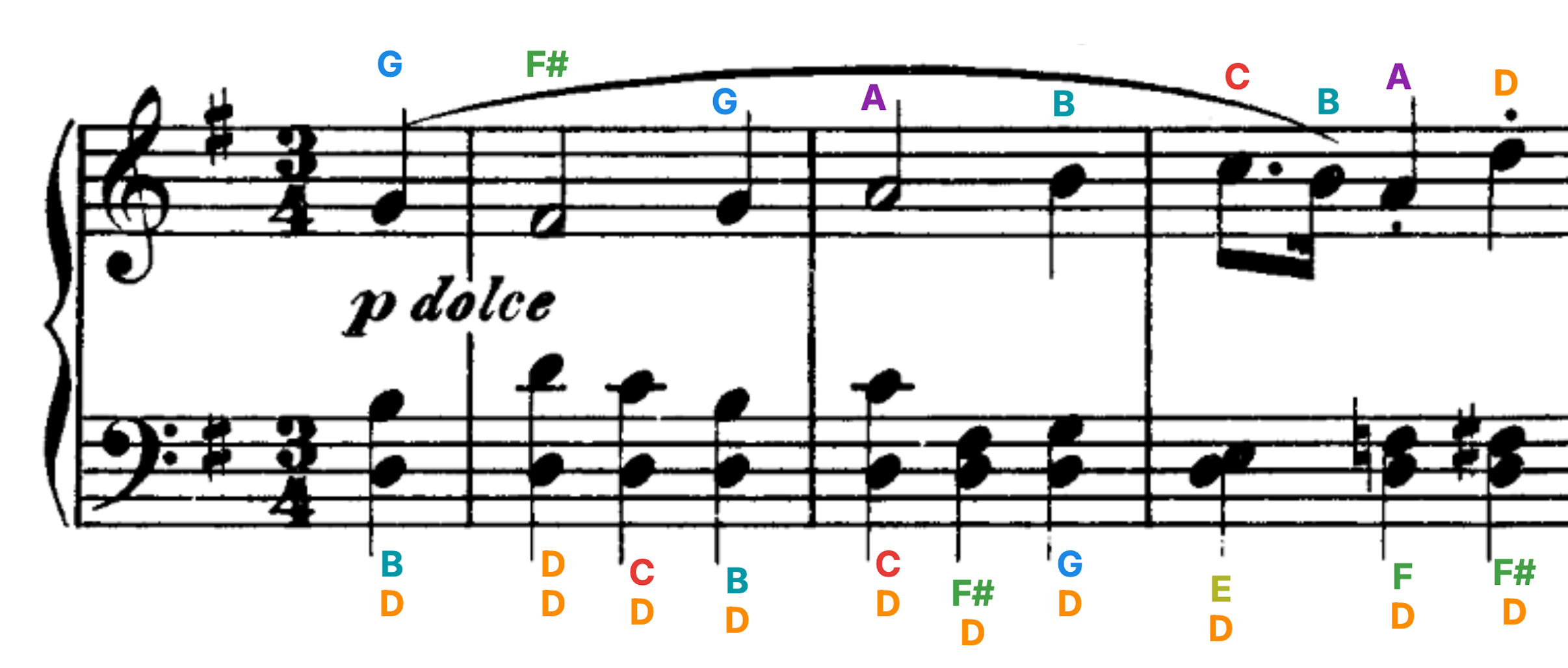
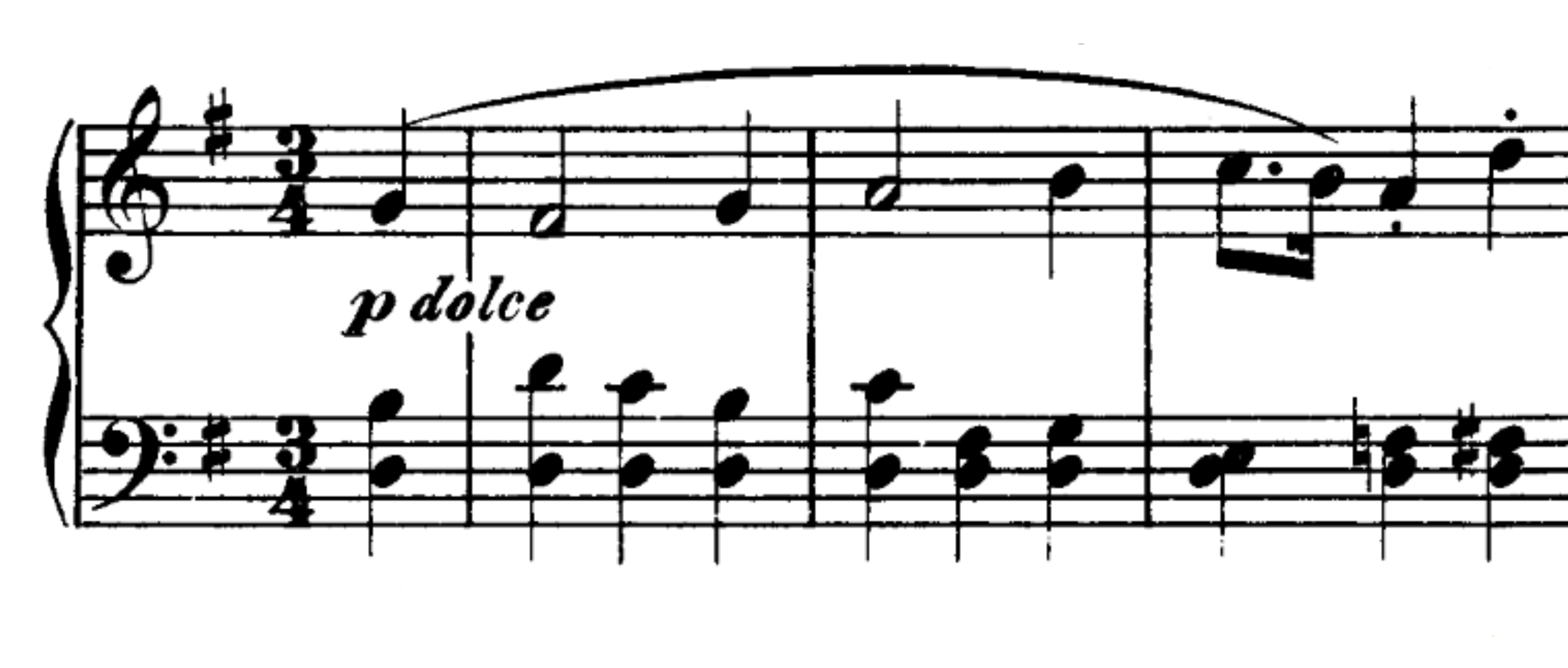
Drag the handle to compare — before and after.
Frequently asked questions
Everything about adding note names to your sheet music.
How to add note letters to a sheet music PDF?
Upload your PDF to O'Sheet. Our AI detects every note and chord on the page, writes the letter name (A, B, C, D, E, F, G) directly under each note, lets you review them in an interactive editor, and exports a clean annotated PDF you can download and print.
Can I download the annotated PDF?
Yes. O'Sheet exports a clean, printable PDF with every note name written under its note. You review and edit the labels in the interactive editor first, then download the final annotated PDF to print or keep.
Is there an app that writes note names on sheet music?
Yes — that's exactly what O'Sheet does. It reads a photo or PDF of any sheet music, labels every note with its letter name or solfège syllable (Do, ré, mi), and exports a printable PDF in seconds.
What if the AI misreads a note on a blurry scan?
Every processed sheet opens inside O'Sheet's interactive editor before you download it. If a scan is messy and a note is mislabeled, you can fix, add, or hide any label with a single click before exporting your final PDF.
Do I need a monthly subscription?
No. O'Sheet uses simple pay-as-you-go page packs (€3 for 15 pages, or €10 for 100 pages) with no recurring fees. Your pages never expire.
Is it free to use online without downloading an app?
O'Sheet runs entirely in your browser — there's no app to download or install. It isn't free: it works on simple pay-as-you-go page packs (€3 for 15 pages, or €10 for 100 pages) with no subscription and pages that never expire.
How to easily read ledger lines on piano sheet music?
Ledger lines are the small extra lines above and below the staff. O'Sheet writes the letter name under every note — including the ones high or low on ledger lines — so you never have to count lines to find a note again.
Does O'Sheet handle key signatures, sharps, and flats (accidentals)?
Yes. O'Sheet reads the key signature and accidentals on the staff, so notes are labeled accurately with their sharps (♯) and flats (♭). You can also adjust any label in the editor before exporting.
Does it work with treble and bass clefs (grand staff)?
Yes. O'Sheet recognizes both Treble clef (right hand) and Bass clef (left hand) simultaneously on a piano grand staff, as well as single-staff sheet music for violin, flute, guitar, voice, and other instruments.
How to convert standard sheet music to Do, ré, mi (solfège)?
Choose solfège instead of letters in the studio, and O'Sheet labels every note with its syllable (Do, ré, mi, fa, sol, la, si) rather than A, B, C.
How to make piano sheet music easier to read for beginners?
Remove the guesswork: label every note with its name. Upload your music to O'Sheet and it adds the note names automatically, so beginners can focus on rhythm, fingering, and playing instead of decoding the staff.
What is the difference between O'Sheet (the app) and the O'Sheet GitHub project?
The GitHub project is an open-source developer library for optical music recognition (OMR). O'Sheet at osheet.app is a consumer web app and interactive studio for musicians: upload sheet music and get an annotated PDF back — no code required.
Is it "sheet music", "music sheet", or "score"?
"Sheet music" is the everyday term for printed music for a single player. A "score" usually means the combined parts of many instruments, such as orchestral or film music. "Music sheet" is less common in English but means the same as sheet music — and O'Sheet works with all of them.
Ready to label your sheet music?
Label my sheet music →